Tower’s Physician Follow-Up Service Kicks Costly SCS Out of MSA

June 20, 2024

Tower’s Physician Follow-Up Service Kicks Costly SCS Out of MSA

Nothing can stall settlement faster than a Medicare Set-Aside (MSA) that includes an unnecessary or unwanted medical procedure. Procedures like surgeries, spinal cord stimulators (SCSs), and intrathecal pain pumps significantly raise the costs of MSA allocations. Fortunately, Tower’s client partners have access to our complimentary Physician Follow-up service that Save on MSAs.

In a recent case, this service successfully removed a costly SCS from the MSA, resulting in a savings of $132,232.

Challenges with SCS Trial Inclusion in MSAs: Addressing Worker Reluctance and CMS Requirements

A worker who had suffered a low back injury was advised by his neurosurgeon and pain management physician to consider an SCS trial. A review of treatment records showed that the injured worker was very anxious about the procedure, and a psychological evaluation revealed a diagnosis of major depressive disorder.

Despite the worker’s reluctance to undergo the procedure, CMS will include it in the MSA, assuming that the worker may change their mind. Tower drafted an initial MSA to include the SCS for a total allocation of $157,500.

Successfully Removing SCS from MSA with Physician Statements: Tower’s Approach

The injured worker’s resistance to the procedure and results of the psych evaluation indicated he would not be a suitable candidate for an SCS. Therefore, we recommended that our Physician Follow-up service obtain statements from both physicians that confirmed the SCS is no longer part of the treatment plan. (If only one physician had provided a statement, CMS would likely keep the SCS in the MSA).

After client approval, in compliance with this jurisdiction’s regulations, Tower notified the plaintiff’s attorney of our intention to communicate with the injured worker’s providers. We then contacted the neurosurgeon and pain management specialist and provided them drafts of physician statements that confirmed the SCS is no longer a treatment option.

While it took several weeks of persistent follow-up with the physicians’ offices, Tower successfully obtained both signed statements.

Efficient MSA Revision: Tower Achieves Significant Cost Reduction and Quick CMS Approval

Tower revised the MSA down from $157,500 to $25,268 and submitted it to CMS. CMS approved the MSA within two weeks for the proposed amount.

In response, Tower’s client said, “Great job, Tower! I am so thankful for our partnership and truly appreciate your hard work and persistence. $132k in savings!!! Woohoo!”

The defense attorney said, “you guys work some real magic here, bravo!”

It’s more methodology than magic, but we often find opportunities to reduce the allocation or mitigate potential increases from CMS review when we draft an MSA. Vague references to potential future procedures mean these costs will be included in the MSA. CMS’s exacting review process requires explicit confirmation of the last dates of service and ongoing treatment and medications.

At no extra charge, Tower contacts physicians, clarifies treatment, drafts physician statements, and obtains medical providers’ signatures to document dates of treatment and ongoing and future medical care. This service paves the way to quick CMS MSA approval and mitigates the potential for unexpected increases.

To learn more about our Physician Follow-up service, please get in touch with Hany Abdelsayed at 888.331.4941 or hany.abdelsayed@towermsa.com.

How to Manage Medicare Set-Asides: Tips from Dan Anders

May 29, 2024

Tower MSA Partners Expert Tips on How to Manage Medicare Set Asides

Our Chief Compliance Officer Dan Anders learned how to write Medicare Set-Asides (MSA) the hard way through trial and error in the days before the Centers for Medicare and Medicaid published complete guidelines.  Even now, the manuals and regulations don’t cover every detail.

And with MSAs details matter.  Proper documentation, down to the way the claimant signs and initials their consent form, is essential.  Dan compiled some tips for managing MSAs with CMS in his May 21 Leaders Speak article for WorkCompWire. These are among the topics covered:

Rated ages

The article highlights the use of rated ages as a way to calculate a fair allocation for the MSA.  Briefly, if an injured worker has comorbidities that will likely reduce their longevity, a rated age can reduce the allocation of the MSA.

How to respond to a dreaded Development Letter from CMS

Dan tells readers how to respond to a CMS Development Letter, which CMS sends when it needs additional information to review submitted MSA. These letters usually request updated treatment records, complete claim payment history of medical, indemnity and expenses, or a document that clearly outlines all the dates of injuries, all carriers, and all accepted and denied body parts.

Development letters can be avoided with the submission of all the correct documents with the MSA.  Some submissions provide an Independent Medical Evaluation or Qualified Medical Evaluator report in lieu of medical records. IMEs, QMEs and similar evaluations may influence a decision, but they cannot replace treatment records. And CMS wants ALL the injury-related records even if workers’ compensation did not pay for the treatment.

When to request a Re-Review

Dan also explains how to handle the Re-Review Appeal process. CMS can make mistakes when issuing counter-highers. He cites several common mistakes, including incorrect prescription drug pricing, misinterpretation of medical records, and using the wrong fee schedule. Always analyze counter-highers for potential errors and consider taking advantage of this appeal.

Tower is here to help manage Medicare Set-Asides

Read the article here and remember that Tower consults with its clients on every aspect of MSA submission and other Medicare Secondary Payer issues. Whether you’re a client yet or not, Dan is available to discuss issues you encounter with your MSAs.  Contact him at daniel.anders@towermsa.com.

Avoid Penalties: Tower’s Section 111 Reporting Audit Service

May 16, 2024

Person performing Section 111 reporting audit service

Tower’s Section 111 Reporting Audit Service Can Help You Fix Systemic Issues and Avoid Penalties. Workers’ compensation payers and other Responsible Reporting Entities (RREs) have a little over five months to get their Section 111 reporting houses in order. And Tower’s Section 111 reporting audit service is here to help you clean things up.

Section 111 reporting – a bit of background

Starting October 11, 2024, RREs, which are workers’ compensation plans, liability insurance (including self-insurance) and no-fault insurance) will be held accountable for the timely reporting of Medicare beneficiary claimants where ongoing responsibility for medicals (ORM) has been accepted or where a Total Payment Obligation to the Claimant (TPOC) has occurred. Civil Money Penalties (CMPs) for untimely reporting of ORM acceptance or TPOC can be thousands of dollars on a single claim.

Three reasons to have Tower audit your Section 111 reporting

  1. Catch the type of errors, omissions and inconsistencies that could trigger thousands of dollars in penalties.
  2. Eliminate systemic flaws that lead to time-consuming and unnecessary conditional payment demands
  3. Help you correct human and technology processes and procedures so you can avoid future reporting errors

What’s involved in the audit?

You provide a set of claim input, claim response and query response files for an agreed-upon period.
Our compliance experts examine this data for issues that can prevent proper and timely reporting of:

  • Acceptance of ongoing responsibility for medicals (ORM)
  • Termination of ORM
  • TPOC

We also look for:

  • Errors in claim input file data
  • CMS-identified errors and flags in claim response files
  •  Consistency of your policies and procedures with CMS Section 111 reporting standards

You’ll receive an audit report and consultation. The report will identify actual or potential errors, omissions and inconsistencies and recommend corrective actions. You’re not left on your own! Tower collaborates with you during the audit and guides the implementation of process and policy changes. As with all our services, we answer your questions and consult with you every step of the way.

How does this help conditional payment resolutions?

If payers or their RREs fail to report ORM termination through Section 111 reporting, Medicare assumes the payer is still responsible for injury-related medical bills. The agency will either deny payment on these or pay them and seek reimbursement through the conditional payment process. The audit identifies TPOC/ORM/Section 111 reporting issues and shows you how to fix them to prevent unnecessary conditional payment demands.

Tower’s Section 111 Audit provides quick fixes and policy and process changes for long-term Section 111 reporting compliance assurance.

Next steps? Contact Hany Abdelsayed, our EVP of Strategic Services at
hany.abdelsayed@towermsa.com or 888.331.4941.

Premier Webinar: Get Ready for Section 111 Reporting Penalties and WCMSA Reporting

May 3, 2024

Premier Webinar: Section 111 Reporting Penalties & WCMSA Reporting

CMS Announces Section 111 Mandatory Insurer Reporting Changes: Penalties and New WCMSA Requirements

The Centers for Medicare and Medicaid Services (CMS) has released several announcements regarding Section 111 Mandatory Insurer Reporting over recent months.  Some relate to Section 111 penalties and some to the new requirement to add Workers’ Compensation MSAs to Section 111 reporting.

Timely and accurate Section 111 reporting is essential if you want to avoid penalties. And WCMSA reporting will introduce new tasks for claims professionals and potentially affect how WC cases with Medicare beneficiary claimants are settled.

To help you and your organization prepare for these changes

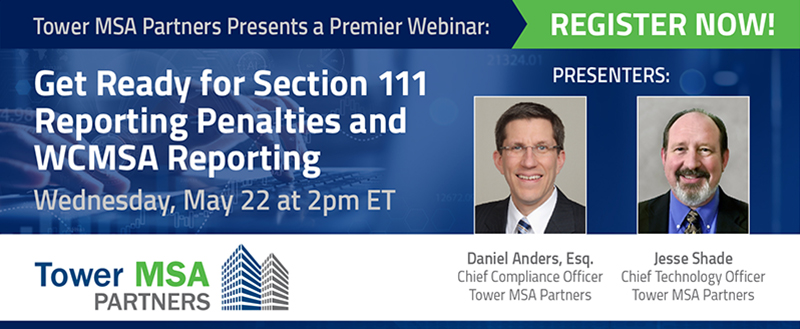
Tower will hold a “Get Ready for Section 111 Reporting Penalties and WCMSA Reporting” webinar on May 22.

Please join Tower’s Chief Compliance Officer Dan Anders and Chief Technology Officer Jesse Shade for this valuable, instructional session. Scheduled for Wednesday, May 22, 2024, at 2 pm ET, the hour-long webinar will address:

  • Criteria and timeline for the implementation of Section 111 Reporting penalties.
  • Practices to mitigate and eliminate the potential for penalties.
  • How a Section 111 reporting audit can identify errors, blind spots and recommend corrective actions to your systems and processes.
  • Criteria and timeline for Workers Compensation MSA reporting.
  • Implication of WCMSA reporting for claims professionals, attorneys, and settling parties.

A Q&A session will follow the presentation, and you can provide questions ahead of time at registration. Please click the link below and register today!

CMS Moves Start Date for WCMSA Reporting to April 2025

April 23, 2024

CMS delays start date for section 111 reporting of WCMSAs

CMS delays start date for Section 111 reporting of WCMSAs to April 2025 and announces new webinar for Q&A

During last week’s webinar, the Centers for Medicare and Medicaid Services (CMS) announced an extension of the start date for Section 111 reporting of WCMSAs from January 2025 to April 4, 2025.

(Due to technical difficulties with the April 16 webcast, CMS has scheduled another webinar for Q&A this Thursday, April 25, 2024, at 2:30 ET. Details on the webinar are here.

Remember, CMS requires Section 111 reporting of WCMSAs of any MSA amount, even if $0. These amounts must be reported whether they are CMS-approved MSAs or not.

CMS details new reporting guidelines and start date for Section 111 WCMSA Implementation

CMS reiterated several points that had been detailed in a prior webinar and through the recent Section 111 User Guide update.  Please review CMS Updates Section 111 NGHP User Guide and WCMSA Reference Guide for this information. New points are below:

  • The start date for WCMSA reporting was changed from January 2025 to April 4, 2025, to give Responsible Reporting Entities (RREs) more time to make the needed changes to their reporting processes.
  • Testing of the new fields will be available beginning on October 7, 2024.
  • All WCMSA fields except Field 43 (Professional Administration EIN) will result in “hard” errors if reported incorrectly. Hard errors cause the TPOC report to be rejected, which can in turn cause the report to be untimely if it is not corrected promptly.
  • As such, hard errors may result in the imposition of civil money penalties (CMPs) although CMS will not impose a CMP for two reporting periods after implementation of WCMSA reporting. In other words, only records on or after October 15, 2025, and with a reportable MSA are subject to a CMP.
  • If an RRE fails to report an MSA, CMS may utilize all available statutory and regulatory options to recover mistakenly made payments, including under the False Claims Act.
  • No changes are made as to what constitutes a reportable TPOC. If a TPOC is reportable, then the WCMSA fields must be completed. If it is not reportable, such as when the WC settlement is $750 or less, then the WCMSA fields are not completed.
  • If multiple defendants are parties to a single settlement, they must report the total TPOC amount (and not their “share”) and the total MSA amount.
  • The Section 111 reporting process is not intended to replace the submission of settlement documents to CMS following the settlement of a claim with a CMS-approved MSA. (Final settlement documents should always be sent to Tower for upload to CMS.)
  • Receipt of the MSA report through the Section 111 reporting process will allow CMS to send information to the beneficiary on the attestation and exhaustion process. (Currently this is not done for most self-administered non-submit MSAs).

CMS outlines impact of “W” records in common working file (CWF) for MSA reporting

CMS also explained that once the MSA is reported, a “W” record will be posted in the Common Working File (CWF), which prevents payments of medical services related to the reported diagnosis codes. The CWF is part of CMS’s system to accurately coordinate benefits, so Medicare does not make payment when another “primary payer” is available.

A copy of the webinar slides can be found here.

Please contact Dan Anders at daniel.anders@towermsa.com with any questions.

CMS Updates Section 111 NGHP User Guide and WCMSA Reference Guide

April 5, 2024

CMS Updates 111 NGHP User Guide and WCMSA Reference Guide.

CMS Releases Updates to MMSEA Section 111 NGHP User Guide and WCMSA Reference Guide

The Centers for Medicare and Medicaid Services (CMS) began April with updates to two of its popular user guides, the MMSEA Section 111 NGHP User Guide and the WCMSA Reference Guide.  Notably, the NGHP User Guide, version 7.5, now includes details on the requirements to report WCMSA amounts with other relevant data. These will need to be reported as of April 4, 2025.

The NGHP User Guide, Section 6.5.1.1 of Chapter III: Policy Guidance, was updated to state:

For workers’ compensation records submitted on a production file with a TPOC date on or after April 4, 2025, Workers’ Compensation Medicare Set-Aside Arrangements (WCMSAs) must be reported.

CMS also updated Chapter IV: Technical Information with similar language.

CMS Revisions to WCMSA Reporting Fields in Chapter V: Appendices

Additionally, CMS updated Chapter V: Appendices to identify the fields that will be added to the Claim Input File Detail for WCMSA reporting:

  • Field 37 – MSA Amount: This will be either $0 or an amount greater than $0. If an annuity is used, then the “total payout” is reported.
  • Field 38 – MSA Period: If the MSA amount is greater than $0, you need to enter the number of years the MSA is expected to cover the beneficiary.
  • Field 39 – Lump Sum or Structured/Annuity Payout Indicator: If the MSA amount is greater than $0, you will enter “L” for a lump-sum MSA or “S” for a structured/annuity MSA.
  • Field 40 – Initial Deposit Amount: If an annuity, then the MSA seed amount is reported.
  • Field 41 – Anniversary Deposit Amount: If an annuity, then the amount of the annual payments.
  • Field 42 – Case Control Number (CCN): If an MSA is submitted to CMS for review or is otherwise submitted to CMS post-settlement, it will be assigned a CCN. The CCN is entered in this field, although this is optional.
  • Field 43 – Professional Administrator EIN: Enter the Employer Identification Number of the professional administrator here if there is one. If this EIN is not provided, the “case administrator” defaults to the beneficiary. If the EIN does not match a registered administrator account in the Workers Compensation Medicare Set-Aside Portal (WCMSAP), then “case administrator” will also default to the beneficiary.

CMS provided a table of error codes for errors identified in the above-reported information.

Responsible Reporting Entities (RREs) can start testing these new fields on October 7, 2024. For further details, see the Tower article, CMS Sets Date for Start of Section 111 WCMSA Reporting.

CMS also incorporated the following notice into the NGHP User Guide:

As of January 1, 2024, the threshold for physical trauma-based liability insurance settlements will remain at $750. CMS will maintain the $750 threshold for no-fault insurance and workers’ compensation settlements, where the no-fault insurer or workers’ compensation entity does not otherwise have ongoing responsibility for medicals (Section 6.4).

The $750 reporting threshold has been in place for several years.

CMS included minor updates to the WCMSA Reference Guide, version 4.0

Specifically, CMS added:

Instruction specific to beneficiaries has been added to encourage them to use their Medicare.gov access to the portal for the most efficient method of submitting attestations (Sections 11.1.1 and 17.5).

For further information on electronic reporting of attestations, see the above-referenced sections in the guide or the Tower article, CMS Adds Electronic Submission Option for MSA Attestations.

CMS also amended the link in Section 10.3 to reflect the most recent CDC Life Table link. The life tables are used to determine life expectancy for calculation of the MSA.

Tower’s Cybersecurity Measures Go the Extra Mile to Protect Your Data

April 3, 2024

Tower MSA Partners Cybersecurity Measures Go the Extra Mile to Protect Your Data

Navigating cybersecurity landscape: Insights from CTOs on cybercrime trends

Cybercrime continues to mount, threatening organizations of all sizes and types. The right cybersecurity measures matter. And which cyber risks worry Chief Technology Officers the most?  That would be the danger of an employee accidentally opening the door to an attack.

A recent survey of CTOs showed that 59% considered human error a significant security threat.  Highlighted in a March 12 Risk & Insurance brief, the survey was conducted by STX Next with results reported in Technology Magazine.

The phenomenal increase in the sales of cyber insurance underscores the growth of cybercrimes and corporations’ concerns about their impact.  Cyber insurance sales, which were $1 billion in 2013, soared to $16 billion in 2023.

Still, only half the companies surveyed had a cybersecurity insurance policy. Tower, of course, has had cybersecurity insurance for years. It’s necessary, but we hope we never have to use it. Our focus is on detecting and preventing attacks in the first place.

Cybercrime spotlight: Cybercriminals zeroing in on users

Cybercriminals are becoming more sophisticated.  Forget the lone hacker in his basement; now there are large “professionalized” cybercrime operations. They know most companies that hold sensitive personal health or financial data have reinforced their networks and systems, and now criminals have their sights on soft targets, the people.

One wrong click can launch a devastating breach. Without the right kind of education and ongoing awareness of new viruses and scams, employees can easily fall prey to phishing, vishing, smishing, and social engineering issues.

Fortifying remote workforce: Tower’s cybersecurity education to combat cybercrime

Cybersecurity education is essential for a remote workforce, where an employee can’t quickly turn to a teammate for a second opinion on an email. Tower’s employees receive extensive cybersecurity training and understand how to do their part to prevent breaches.

Tower equips our remote workforce with virtual desktop infrastructure (VDI), including VPNs, anti-virus software, and software that analyzes and downloads electronic email attachments before they can be accessed by any of our devices. We also conduct monthly training sessions that cover topics such as how to detect phishing attacks and procedures for reporting suspicious email and malware, and how to handle email attachments that may contain them.

Enhancing cybersecurity protocols: Tower’s robust defense system against cybercrime

We don’t stop there, though.  We conduct annual penetration testing, also called pentesting, where a third-party security expert tries to find and exploit vulnerabilities. Ntierty, our cloud provider, keeps us up to date on the latest viruses and scans our network every week. Tower’s IT department also conducts its own weekly scans using different software as an extra precaution.

And the Tower management team engages in annual cybersecurity tabletop exercises to simulate real-world attacks on Tower’s systems.  These simulations probe for known vulnerabilities, which allows us to develop new strategies and procedures to secure our systems.

We also review our controls, processes and procedures to assess their effectiveness every year in a formal SOC 2, Type 2 audit.  All this is done to continually identify potential vulnerabilities so we can proactively fortify our defenses.

Tower invests significant amounts of time and money to ensure business continuity and the protection and privacy of data. This may sound like overkill, but we understand the risks, and we’re not willing to take chances on our security and the protection of our clients’ data.

To learn more about Tower’s security suite, please contact Chief Technology Officer Jesse Shade at jesse.shade@towermsa.com.

Links

Human Error is Biggest Cybersecurity Threat, CTOs Say | Technology Magazine

5 things business leaders must know to combat the cybercrime menace – Liberty Mutual Business Insurance

https://towermsa.com/your-settlement-partner/security-confidentiality/

CMS Sets April 16 for Webinar on Section 111 Reporting of WCMSAs

March 27, 2024

Webinar on Section 111 Reporting of WCMSAs

Prepare for Change: CMS Webinar on Expanding Section 111 NGHP TPOC Reporting to Include WCMSA Information

The Centers for Medicare and Medicaid Services has scheduled a webinar for April 16, 2024, at 2 PM ET to provide updates on the implementation of Section 111 reporting of Workers Compensation Medicare Set-Asides (WCMSAs).  Per the March 25, 2024 announcement:

CMS will be hosting a second webinar regarding the expansion of Section 111 Non-Group Health Plan (NGHP) Total Payment Obligation to Claimant (TPOC) reporting to include Workers’ Compensation Medicare Set-Aside (WCMSA) information. After the first webinar in November, CMS received additional questions and feedback from the industry. The intent of this webinar is to ensure that RREs will be prepared for the change once implemented. With that in mind, this webinar will include a background recap, summary of technical details, updated timelines and CMP impacts. The presentation will be followed by a question and answer session. Because this expansion impacts reporting of WCMSAs, it is strongly recommended that Responsible Reporting Entities (RREs) that report Workers’ Compensation settlements attend.

There is no pre-registration for the webinar.  Full details can be found here.

As of April 4, 2025, TPOC reporting must include Workers’ Compensation Medicare Set-Aside Arrangements (WCMSAs). (See CMS Sets Date for Start of Section 111 WCMSA Reporting).

The WCMSA reporting requirement applies to both CMS-approved and non-approved MSAs.  This information must be reported if the insurance type is workers’ compensation and the TPOC amount is greater than $0. The rule will be prospective only, meaning it applies to TPOC dates of April 4, 2025 and later.

To collect this data, CMS is adding new fields to the Section 111 Claim Input File.

Tower will provide a post-webinar summary.  If you have any questions, please contact Dan Anders at daniel.anders@towermsa.com or 888.331.4941.


Tower Webinar Shared the Best Ways to Manage Conditional Payments

February 29, 2024

Man with magnifying glass and calculator adding up Conditional Payments.

What are conditional payments?  How and when should payers respond to Conditional Payment Letters, Notices and Demands? What happens if you don’t? Our Chief Compliance Officer Dan Anders and Director of MSP Compliance Services Ada Lopez covered these topics and much more in our February 7 webinar.  Here’s a quick recap.

How does Medicare know who the primary payer is … or that a case has settled?

The Medicare Secondary Payer Act was written to protect the Medicare Trust Fund. And the Centers for Medicare and Medicaid Services developed Coordination of Benefits (COB) rules and processes to keep Medicare from paying for treatment that is covered by a primary payer (workers’ compensation, liability, no-fault). If Medicare has made a payment for which a primary payer exists, then such a payment is considered conditional, meaning it is conditioned upon reimbursement to the Medicare Trust Fund.

Most commonly, CMS learns that a primary payer for a Medicare beneficiary’s claim exists through these Section 111 reporting triggers:

  • Acceptance of Ongoing Responsibility for Medical (ORM), usually in a WC or no-fault claim
  • Total Payment Obligation to Claimant (TPOC), typically a settlement

Timeliness and accuracy are keys to protecting the payers who are the Responsible Reporting Entities (RREs)

  • ORM and TPOC should be reported via Section 111 every quarter.
  • As of Oct. 11, 2024, RREs will be subject to penalties if ORM or TPOC are reported more than 365 days late. (Link to Penalty blog)
  • Report valid ICD-10 codes:
    • For ORM, report only diagnosis codes that are accepted on the claim.
    • For TPOC, only report diagnosis codes that are released as part of the settlement.
    • Be careful to report only codes that apply to the claim. (Medical bills and records often contain non-claim-related ICD-10 codes.)

Conditional payment recovery

The webinar took a deep dive into the processes and communications the Benefits Coordination & Recovery Center (BCRC) and Commercial Repayment Center (CRC) deploy to obtain reimbursements. Dan and Ada also discussed ways to dispute conditional payment notices and demands.  It’s worth requesting a recording of the session from Dan (daniel.anders@towermsa.com) just to get this information.

Some best practices for conditional payments

  • Make sure claims are accurately and timely reported for ORM and TPOC.
  • Update ICD-10 codes when additional body parts are accepted or denied or they need correction.
  • Terminate ORM when appropriate, e.g., settlement.
  • Identify your Medicare-eligible claimants.
  • Immediately review and act on conditional payment correspondence and meet the deadlines!
  • Make sure settlement terms specify who is responsible for conditional payments post-settlement.
  • When a Demand is received, either pay or appeal. Pay attention to Conditional Payment Letters (CPLs) and Conditional Payment Notices (CPNs) and take action on them, but do not pay before the Demand.
  • Be sure to respond to the Demand on time. Otherwise, the debt will eventually be transferred to the U.S. Treasury.
  • Follow-up with the CRC or BCRC to ensure payment was received and applied to the debt and that no debt remains.

If you don’t work with conditional payments on a daily basis, consider partnering with Tower for conditional payment identification, resolutions and appeals. And, if you have any questions about conditional payments, even on specific claims, or any other MSP compliance issues, Dan Anders is happy to answer them.  Email daniel.anders@towermsa.com.
Also, let us know what areas of MSP compliance you would like us to cover in future Premier Webinars. We want to help you.

CMS Sets Date for Start of Section 111 WCMSA Reporting

February 27, 2024

Stethoscope on Workers’ Compensation Medicare Set-Aside Arrangements

The Centers for Medicare and Medicaid Services has announced that Total Payment Obligation to Claimant (TPOC) Section 111 reporting must include Workers’ Compensation Medicare Set-Aside Arrangements (WCMSAs) effective April 4, 2025.  This means CMS will require workers’ compensation payers to report MSA amounts, even if $0, concurrently with settlement amounts, when the TPOC date is April 4, 2025 and later. See CMS’s February 23 Technical Alert for details.

CMS previously explained this significant expansion in a November 13, 2023 webinar (See CMS to Require Section 111 Reporting of WCMSA Amounts).

In the February alert, CMS reiterates that this new reporting requirement aims to improve coordination of benefits for Medicare beneficiaries.  Specifically, if a WCMSA is reported, then the WCMSA will be considered primary for payment before Medicare.

Notably, the WCMSA reporting requirement applies to both CMS-approved and non-approved MSAs.  The rule will be prospective only, meaning it applies to TPOC dates of April 4, 2025 and later.

To collect this data, CMS is adding new fields to the Section 111 Claim Input File. This information must be reported if the reported insurance type is workers’ compensation and the TPOC amount is greater than $0. Here is a look at the new fields:

  • MSA Amount: This will be either $0 or an amount greater than $0.  If an annuity is used, then the “total payout” is reported.
  • MSA Period: If the MSA amount is greater than $0, you need to enter the number of years the MSA is expected to cover the beneficiary.
  • Lump Sum or Structured/Annuity Payout Indicator: If the MSA amount is greater than $0, you will enter “L” for a lump-sum MSA or “S” for a structured/annuity MSA.
  • Initial Deposit Amount: If an annuity, then the MSA seed amount is reported.
  • Case Control Number (CCN): If an MSA is submitted to CMS for review or is otherwise submitted to CMS post-settlement, it will be assigned a CCN.  The CCN is entered in this field, although this is optional.
  • Professional Administrator EIN: If the MSA includes a professional administrator, enter the Employer Identification Number of the professional administrator here.  If a professional administrator EIN is not provided, the “case administrator” defaults to the beneficiary.  If the EIN submitted does not match a registered administrator account in the Workers Compensation Medicare Set-Aside Portal (WCMSAP), then “case administrator” will also default to the beneficiary.

CMS also provided a table of error codes if errors are identified in the above-reported information.

Testing of the new fields will be made available to Responsible Reporting Entities (RREs) beginning on October 7, 2024.

Key Takeaways

The data CMS requires to be reported is not commonly captured in payer and TPA claims systems.  Consequently, claims systems must be updated with the new fields and claims professionals will need to be trained on when, how, and what to enter into these fields.

Tower will work with our Section 111 reporting clients to provide further technical information on reporting these fields, including testing. We can also assist with capturing this data for reporting purposes.

Questions remain over what CMS will do with this data once it has it.  What if the Section 111 reporting data contradicts the CMS-approved MSA data?  If a non-CMS approved MSA exhausts prematurely (meaning the funds were insufficient to cover the number of years the MSA was to cover), will CMS step in and pay for injury-related medical care, or will they claim that it was underfunded?  If they claim that it was underfunded, does the individual have a right to challenge such a determination and how does that process work?

CMS states that this technical alert, with additional information, will be incorporated into an April 2024 version of the MMSEA Section 111 Mandatory Reporting User Guide.  We will provide further updates with the release of that document.

Please get in touch with Chief Compliance Officer Dan Anders at (888) 331-4941 or daniel.anders@towermsa.com with any questions.